
Unlike the Windows Recycle Bin, deleted PDM files are managed within the vault and can be accessed through the Deleted Items tab.
How to Recover Deleted Files
1. Open your SOLIDWORKS PDM vault in Windows File Explorer.
2. Navigate to the folder where the file was originally located.
3. Right-click the folder and select Show more options then Properties.
4. Select the Deleted Items tab.
5. Locate the deleted file, right-click it, and select Recover.
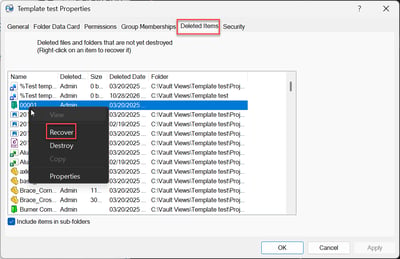
The file will be restored to the vault, provided you have the necessary permissions.
Deleted vs. Destroyed Files
SOLIDWORKS PDM provides two methods of removing files:
• Delete: Removes the file from the vault view but allows it to be recovered through Deleted Items.
• Destroy: Permanently removes the file from PDM. Destroyed files cannot be recovered through the PDM interface and would require a suitable backup for recovery.
Note: The Destroy option immediately removes the file from the archive server unlike the Delete option which is why this can not be undone once performed.
Conclusion
SOLIDWORKS PDM provides a built-in recovery system for accidentally deleted files. Before assuming a file is permanently lost, check the Deleted Items tab in its original folder.
For more information, visit the SOLIDWORKS PDM Help – Managing the Deleted Files List.