
The Web.config file allows PDM Administrators to configure download permissions for users and groups, preventing users and groups from downloading files via the Web2 browser interface. This can protect intellectual property if your company needs to provide view-only access with no download capability to organizations or users outside the company.
Web2 Interface
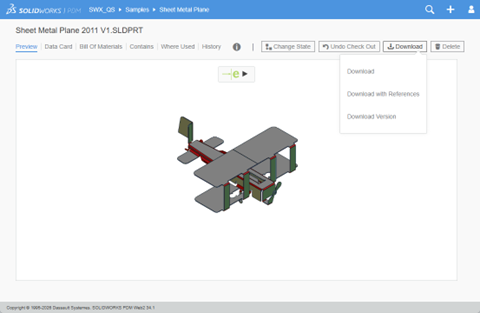
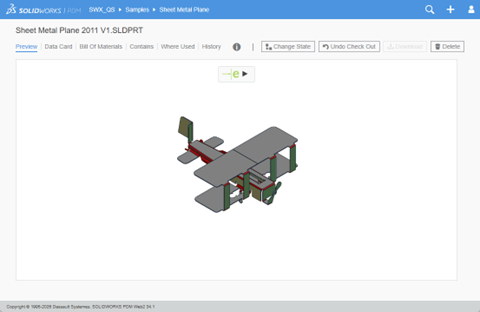
The first image shows download access, the second shows denied access. There is no warning to the user when it is denied. The download button is either active or inactive.
Editing the Web.config file
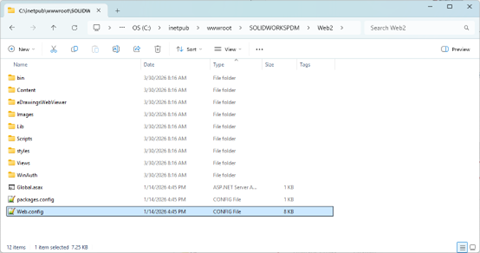
Open File Explorer and navigate to the Web.config file. The default locations is: C:\inetpub\wwwroot\SOLIDWORKSPDM\Web2\
Open the Web.config file with a text editor like Notepad++ (this editor will recognize the XML format and color-code the text, making it easier to read).
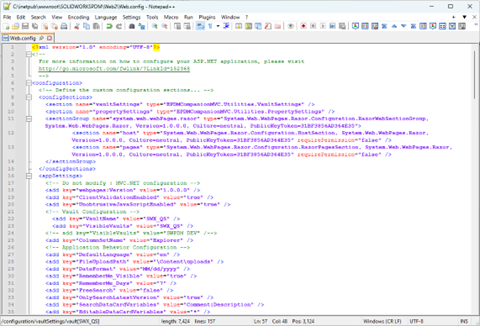
Locate the default <vaultSettings> section and modify it to restrict groups or users from downloading. Once the file is saved with the changes, the denied download access will be applied to the users the next time the browser is refreshed.
Note: Make sure to change the vault name “<vault name=”SWPDM”…” or else no changes will be evident next time the user is logged in.
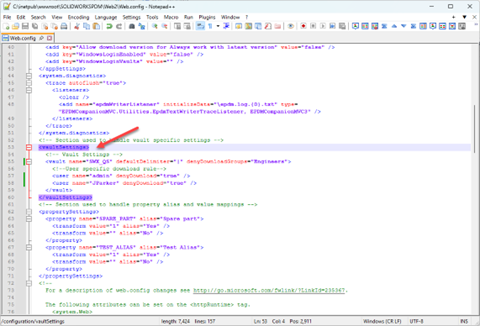
Vault & User Settings Reference
| Vault Setting | Description |
| name | Name of the vault. Create a separate <vaultSettings> section for each vault that needs download permissions controlled. |
| defaultDelimiter | Delimiter used to separate group names in the denyDownloadGroups setting. The default delimiter is |. |
| denyDownloadGroups | Groups that have download permissions denied in the specified vault. You must separate group names by the delimiter specified in the defaultDelimiter setting. |
| User Setting | Description |
| name | User login name. Create a separate <user> node for each user. |
| denyDownload | Denies download permissions for users from the specified vault. If set to false, the user can download files. If set to true, the user cannot download files. |