
This can happen when you have used an alternative download or flash drive, and those files are no longer in the location that the installer is checking, or they have been removed. To resolve the issue, the swdata99.id file must be recreated (and potentially the parent directory) in the location listed in your error message.
- When you encounter the error, make a note of the listed path or take a screenshot of the path listed, you will have to ensure you navigate to this location exactly.
- Navigate to the location listed, as your particular installation may likely have a different path than default, and you may need to create one or more folders so that the listed path exists.
- Create a new .txt file in this location called swdata99 and open it using Notepad. You can do this by right clicking in the folder, and selecting New > Text Document. Name the file swdata99.
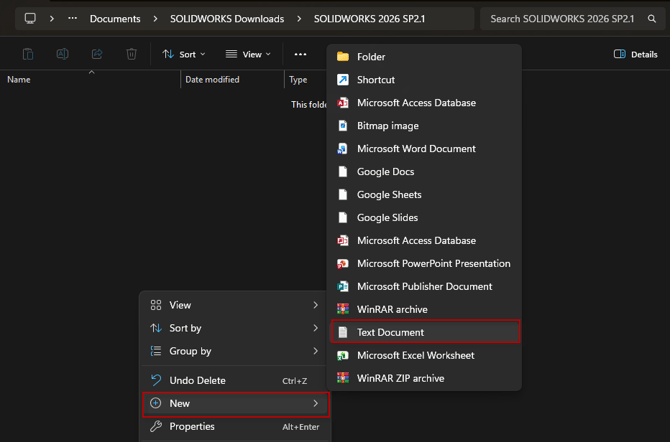
- The body of the file should contain only the version of SOLIDWORKS that you are currently attempting to install or modify. The format is: SOLIDWORKS 20XX SPX.X
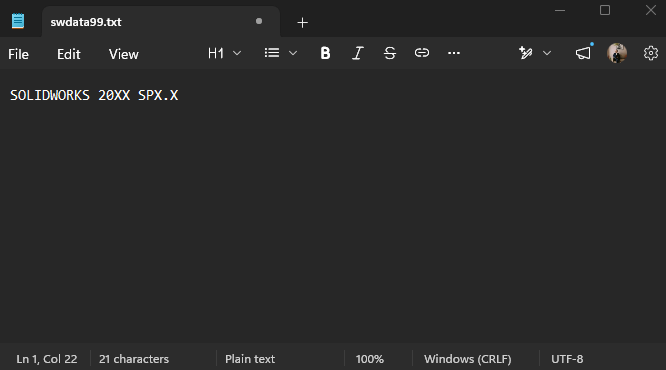
- For example, SOLIDWORKS 2026 SP2.1
- Save this text document and close out notepad.
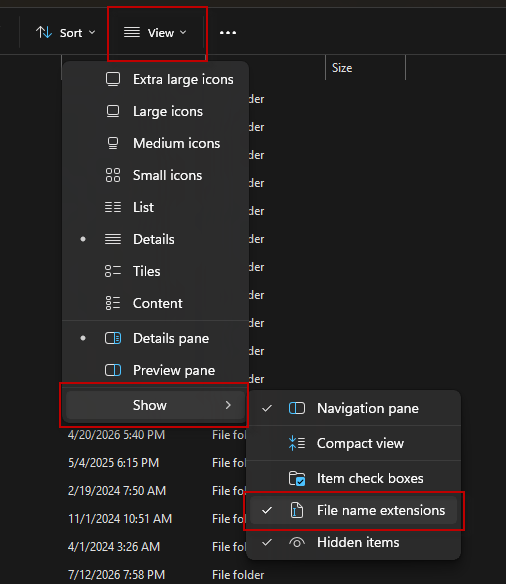
- Rename the file from swdata99.txt to swdata99.id. If you cannot already see the .txt file name extension, then you will need to enable it in the Windows Explorer settings.
- To do that, at the top of the Windows File Explorer window, select View > Show > File Name Extensions. This will allow you to see and modify the file name extensions within the File Explorer. This can be turned off after renaming the file if desired.
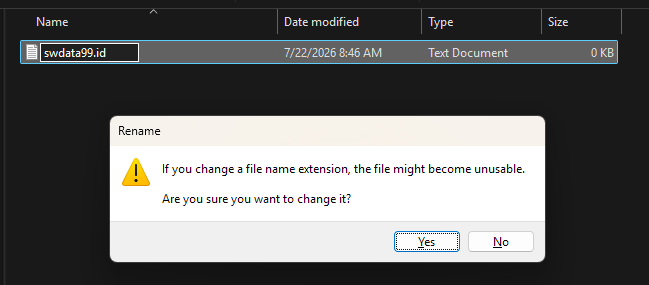
- Rename the .txt to .id, and select that you want to proceed if Windows warns you about changing the extension.
- Return to the SOLIDWORKS installer, and you will be able to proceed through the installation without issue.