
The process of requesting an API key is pretty straightforward. You will need to have an active support subscription, license of SOLIDWORKS, and you will need a new API key for a new major release of SOLIDWORKS.
API Key Request
- Navigate to https://www.solidworks.com/support/subscription/key-request/ and log in with your username and profile.
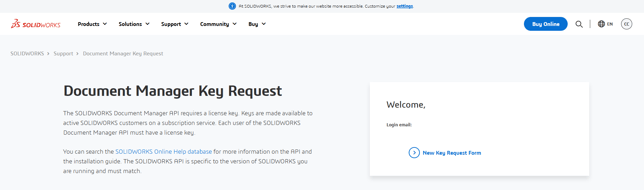
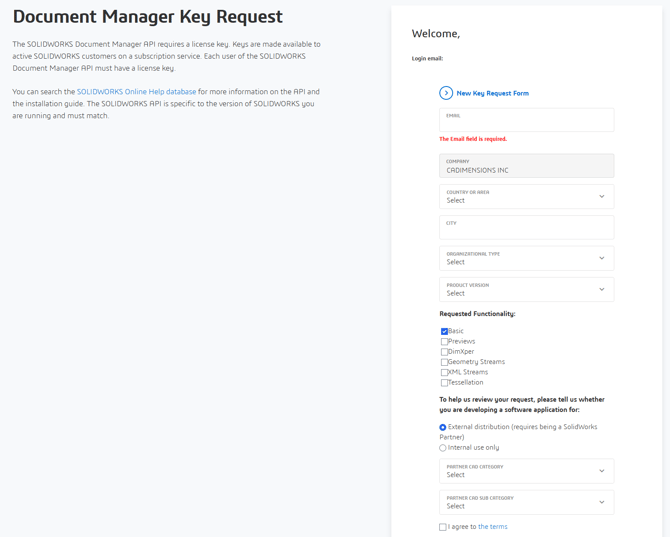
- Click on the New Key Request Form on the right side and Fill out the required fields to request the correct API key and click Submit. After submitting the request, you should receive a response within a couple of days.
There is additional in depth information available in the SOLIDWORKS Help here: SOLIDWORKS API Help
NOTE: When submitting the request, you will be asked to specify the requested functionality. While there is not an in depth description on the page, we have provided an explanation of each option below.
- Basic: All interfaces, methods, and properties except for those listed below
- Previews: Preview and stream methods and properties on all ISwDMConfiguration, ISwDMDocument, and ISwDMSheet interfaces
- DimXpert: DimXpert methods and properties on all ISwDMConfiguration and all DimXpert-related interfaces
- Geometry Streams: Preview, stream, and imported body methods and properties on all ISwDMConfiguration interfaces
- XML Streams: XML stream methods on all ISwDMDocument interfaces
- Tesselation: Display List DLL (previously called the Display List Sample); although not a component of the SOLIDWORKS Document Manager API, its license key controls access to the Display List DLL
Installation
The SOLIDWORKS Document Manager API is a COM object contained in SwDocumentMgr.dll. The SOLIDWORKS Document Manager DimXpert API is contained in dimxpert.dll. The zlib.dll DLL was automatically installed in the following folder if you installed the SOLIDWORKS software: <disk>:\Program Files\Common Files\SOLIDWORKS Shared
SwDocumentMgr.dll and dimxpert.dll were also automatically registered if you installed the SOLIDWORKS software. If you did not install the SOLIDWORKS Design software on the system where you want to use these APIs, you can manually register them. SwDocumentMgr.dll and zlib.dll must either reside in the same folder or be accessible via the Windows search path.
To manually register SwDocumentMgr.dll:
-
- On the task bar, click the search icon.
- Type "C" in the Type here to search field.
- Right-click on Command Prompt, and select Run as administrator.
- Click Yes in the dialog box.
- In the Administrator Command Prompt, type:
regsvr32 "<disk>:\Program Files\Common Files\SOLIDWORKS Shared\SwDocumentMgr.dll"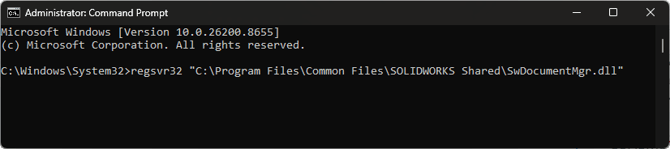
- Click OK.
To manually register dimxpert.dll:
-
- On the task bar, click the search icon.
- Type "C" in the Type here to search field.
- Right-click on Command Prompt, and select Run as administrator.
- Click Yes in the dialog box.
- In the Administrator Command Prompt, type (vX.X is the name of a version directory that contains RegAsm.exe):
C:\WINDOWS\Microsoft.NET\Framework\vX.X\regasm /codebase "<disk>:\Program Files\Common Files\SOLIDWORKS Shared\dimxpert.dll" - Click OK.
Not working like it should?
If things didn’t go as planned, please contact CADimensions Technical Support for further assistance.
If you have an existing case, please contact the Application Engineer you are working with; otherwise submit a new case online.